
Selling a course or coaching on Systeme.io takes seven setup tasks. None of them needs code. The hard parts are the offer you’re selling and the people you sell it to, and no platform fixes those for you.
This guide covers both paths, courses and coaching, in one place. You’ll see what the platform does, what to verify before you promise anything to customers, and how to set it up task by task.
🚀 Sell courses and coaching from one free account: Systeme.io
The free plan includes 1 course with unlimited students, a booking calendar, 3 funnels, 2,000 contacts, unlimited emails, and 0% platform transaction fees. No credit card.👉 Create your free Systeme.io account (affiliate link)
Last reviewed: October 2026. Menus and limits change, so check your own dashboard before you build.
Read This First
I’m an affiliate for Systeme.io, so links labeled “affiliate link” can earn me a commission at no extra cost to you. I haven’t included invented student results or sales numbers. Where sources disagreed about a feature, I’ve put it in a “check first” list instead of guessing.
The screenshots in this guide come from my own Systeme.io account. Systeme.io updates its interface regularly, so your screen may look slightly different from mine.
Pick Your Lane in 60 Seconds
| You sell… | You’ll build | Plan to start on |
|---|---|---|
| A self-paced course | Course area, sales page, checkout, welcome emails | Free (1 course) |
| 1-on-1 coaching or consulting | Booking calendar (free or paid sessions), a discovery-call funnel, follow-up emails | Free |
| A group program | Course area for lessons + calendar for live calls + community space | Free to start (1 course, 1 community) |
| A mix of all three | A discovery call that leads to a package, plus a course for people who aren’t ready for coaching | Startup ($17/month) once you need more than 1 course |
What’s Confirmed, and What to Check First
Confirmed by Systeme.io’s own pages and help center:
- A course builder with modules and lectures, video lessons, drip scheduling, quizzes, course bundles, and student progress tracking (see the official course page).
- Unlimited students on every plan, including free, and 1 course on the free plan.
- A built-in booking calendar with individual and group events, free or paid bookings, two-way Google Calendar sync, and automatic Zoom or Google Meet links (see the help article).
- Funnels with checkout, order bumps, and upsells; unlimited email sends; CRM pipelines; and 0% platform transaction fees.
Check these in your own account before you promise them to customers:
- Completion certificates. Sources disagree on whether they exist and on which plan. If certificates are part of your offer, confirm in your course settings first.
- Video upload vs embedding. Systeme.io says you can upload video lessons, while some reviewers describe embedding from video-hosting services. Test an upload and note any size or format limits on your plan.
- A dedicated student app. I couldn’t confirm one. Assume students use a browser unless you find otherwise.
- Quiz and upsell limits on your plan. Features can exist while limits vary.
The Seven Setup Tasks
Task 1: Create the account and pick a plan
Start free. You only need to upgrade when you hit a real limit: a second course, more than 2,000 contacts, or evergreen webinars.
Done when: you can log in and see the funnels, courses, and calendar areas.
Task 2: Build the course
Create the course, add modules, then add lessons. Upload videos and attach worksheets. Here is the screen where you add a new course in my account:
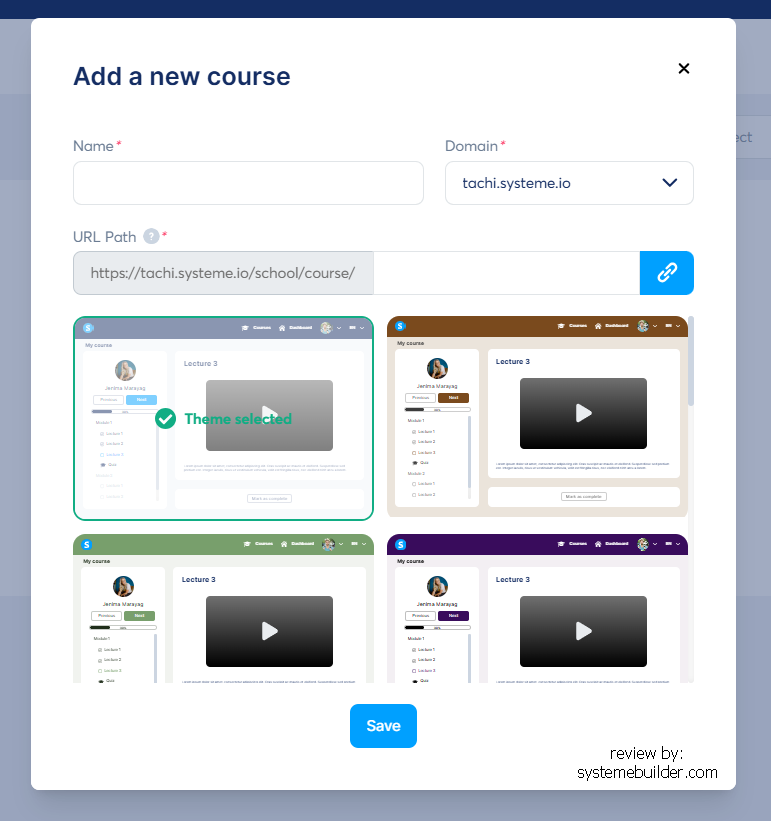
Use drip scheduling only if it helps students (for a cohort, for example). Don’t use it to slow down people who paid and want to move.
Keep each lesson to one idea. Lock modules only when order truly matters. Add a quiz where a wrong answer would send the student off track. For help designing the content itself, read how to create an online course.
Done when: you can log in as a test student and complete lesson one without help.
Task 3: Create the product and checkout
Set the price, connect a payment processor, and attach the course so access is granted automatically after payment. Systeme.io’s pricing page lists several processors, but availability depends on your country, so confirm which one actually works for you before you plan a launch date.
Done when: a test purchase (using your processor’s test mode or a small real payment) grants course access.
Task 4: Write the sales page
In Systeme.io your sales page lives inside a funnel, so you start by creating one. This is the screen for creating a new funnel in my account:
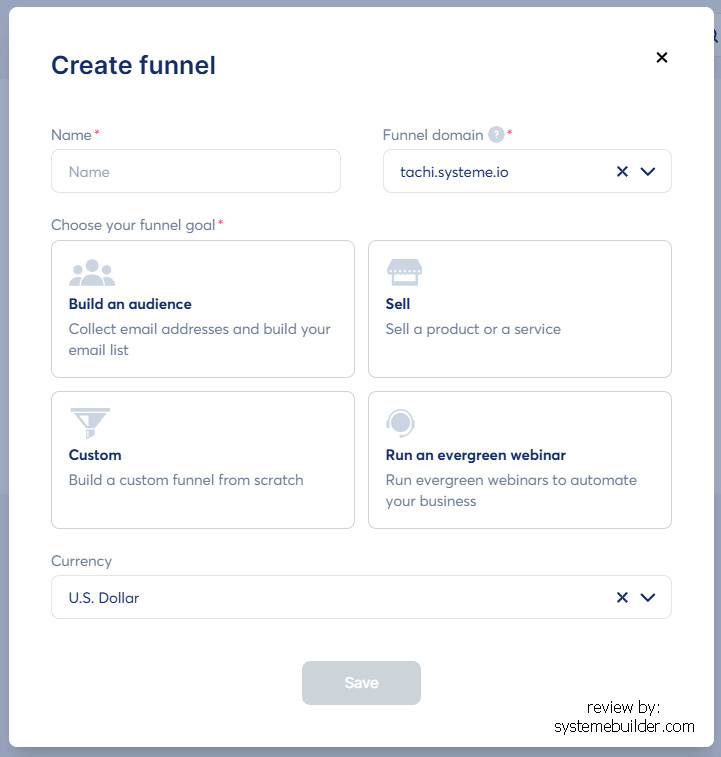
Then write the page in this order: result-focused headline, who it’s for (and who it isn’t), the problem, what’s inside, about you, real proof, price and refund terms, FAQ, and a button repeated down the page. If you don’t have testimonials yet, say specifically what the buyer gets. Never invent quotes. Start from a template and the blueprints in our funnel guide.
Done when: a stranger can read the page and tell you what they’d get and what it costs.
Task 5: Set up the emails
You need three short sequences: a welcome sequence for new subscribers, an onboarding email for buyers (login steps and the first lesson), and a launch sequence for your offer. Here is the screen for creating a new email campaign in my account:
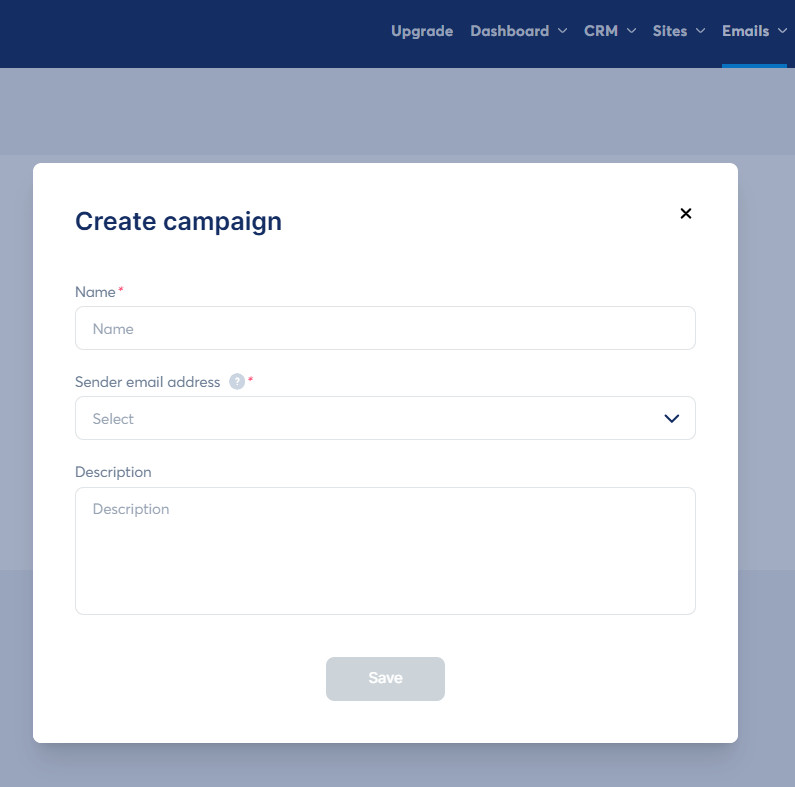
On the free plan you get just one automation rule, so keep the structure simple (for example, one rule that adds new sign-ups to the welcome campaign). Our email automation guide shows the setup.
Done when: signing up and buying each trigger the right email within minutes.
Task 6 (coaches): Set up the booking calendar
Create an event for each thing you sell: a free discovery call, a paid single session, and maybe a group workshop. Connect Google Calendar to avoid double-bookings, and connect Zoom or Google Meet to generate meeting links.
How you add the calendar depends on the booking type:
- Free bookings: add the calendar to an opt-in page, sales page, or blog page.
- Paid bookings: add the calendar to an order form or payment page using the “Paid calendar” element, so people pay when they book.
Systeme.io describes collecting deposits or full payments at booking, and bookings become contacts in your CRM. Set a clear cancellation and rescheduling policy on the booking page.
Done when: you can book and pay for a session as a test client and see the booking in your calendar and CRM.
🗓️ Set up your course area and booking calendar free
👉 Start free on Systeme.io (affiliate link)
Task 7: Test everything and go live
Run this checklist before you tell anyone:
- Open every page on your phone and tap every button.
- Sign up with a fresh email and check the welcome email (including the spam and promotions folders).
- Complete a test purchase and confirm access and the onboarding email.
- For coaching, book and pay for a test session.
- Check the privacy, terms, and refund links on the sales page and checkout.
Done when: every item above works without you fixing anything by hand.
The Offer Ladder: How Courses and Coaching Fit Together
| Rung | Offer | Built with |
|---|---|---|
| 1. Free | Lead magnet or free lesson | Opt-in funnel + welcome emails |
| 2. Low-priced | A short self-paced course | Course area + checkout (+ order bump) |
| 3. Group | Cohort or workshop series | Course lessons + group events in the calendar + a community |
| 4. 1-on-1 | Coaching package or consulting | Discovery-call funnel + paid bookings or a package checkout |
You don’t need all four. A good start is rung 1 plus either rung 2 or rung 4, depending on whether you’d rather teach once and sell many times or trade time for higher prices.
Pricing Without Guesswork
I won’t give you a “sweet spot” price, because it depends on your audience and the result you deliver. Use this instead:
- Value the result. What is it worth to the buyer (time saved, income gained, a problem solved)?
- Check the alternatives they already pay for: books, other courses, coaching. Your price should sit in a believable range beside them.
- Test a founding price first, then raise it as you collect real results.
- Count what you keep. Processor fees apply. For example, a typical card fee of 2.9% + $0.30 on a $79 sale leaves about $76.41. Systeme.io takes no platform transaction fee on top.
For coaching, price packages (a set number of sessions with a defined outcome) rather than single hours when you can, and state the cancellation and refund terms up front.
Launching Without Fake Urgency
- Pre-sell if you can. Offer a founding-member price with a clear delivery date, and deliver on it.
- Warm up your list with a few useful emails before you pitch.
- Use real deadlines only. If you say the cart closes Friday, close it Friday. Countdown timers that reset are misleading and can break advertising rules.
- Offer a fair refund policy and state it plainly.
- Ask for testimonials after students get results, with permission to publish them.
What Each Plan Means for Course and Coaching Sellers
| Plan | Courses | Contacts | Notes |
|---|---|---|---|
| Free ($0) | 1 | 2,000 | Booking calendar, 3 funnels, 1 community, 1 automation rule |
| Startup ($17/month) | 5 | 5,000 | 10 funnels, more automation |
| Webinar ($47/month) | 20 | 10,000 | Evergreen webinars start here |
| Unlimited ($97/month) | Unlimited | Unlimited | No caps on core resources |
Annual billing gives two months free. Details are in the pricing guide and the free plan guide. For comparison, Kajabi’s Basic plan lists at $179/month ($143 on annual billing) with a 2,500-contact cap.
When Another Platform Fits Better
- You need a polished, branded learning environment as a core part of your offer. A premium course platform may suit you better, at a higher price. See Systeme.io vs Kajabi, vs Teachable, and vs Thinkific.
- Certificates or advanced assessment are central to your offer and you can’t confirm Systeme.io supports what you need.
- You run a large team or an agency-style business that needs deep CRM and SMS, in which case look at heavier platforms (see our funnel builder comparison).
For everyone else starting out, the free plan costs nothing to test, which is the lowest-risk way to learn whether it fits.
Five Ways This Goes Wrong
- Recording before anyone has paid. Validate first.
- Selling a feature you haven’t verified. Check certificates and video limits before they’re on your sales page.
- Skipping the test purchase. A broken checkout costs more than an afternoon of testing.
- No follow-up emails. Most buyers need more than one touch before they say yes.
- Ignoring the rules. Use real testimonials, honest claims, a privacy policy, a refund policy, and an unsubscribe link and mailing address in marketing emails. This is general information, not legal advice.
FAQ
Can I sell courses on Systeme.io for free?
Yes. The free plan includes 1 course with unlimited students, a checkout, and 0% platform transaction fees. You’ll still pay payment-processor fees when you sell.
Can I take paid coaching sessions on Systeme.io?
Yes. The booking calendar supports paid bookings, which require adding the calendar to an order form or payment page. It works with Google Calendar, Zoom, and Google Meet.
Does Systeme.io support drip content and quizzes?
Yes. The official course page lists drip scheduling and quizzes, plus module locking and progress tracking. Check any limits on your plan.
Does Systeme.io issue course certificates?
Sources conflict. Check your course settings before you promise certificates to students.
Can I host video on Systeme.io?
Systeme.io says you can upload video lessons, and some reviewers describe embedding from other video services. Test an upload on your plan and note any file limits.
How do I accept payments?
Connect a payment processor in your account. Several are listed on the pricing page, and availability depends on your country, so confirm which one operates where you do.
Is Systeme.io better than Kajabi, Teachable, or Thinkific?
It’s cheaper and bundles funnels, email, and a booking calendar, while dedicated course platforms usually offer a more polished learning experience. Which is better depends on how much polish matters for your offer.
How much does it cost after the free plan?
Startup is $17/month (5 courses, 5,000 contacts), Webinar is $47/month, and Unlimited is $97/month. Annual billing gives two months free.
Your Next Step
Pick your lane, run through the seven tasks, and test everything as a customer before you sell to anyone. Start on the free plan and upgrade only when a limit blocks you.
✅ The lowest-risk way to start: build your first course or booking page on a free plan and test it end to end.
👉 Create your free Systeme.io account (affiliate link)
Keep going with how to create an online course, how to create a funnel in Systeme.io, or the full Systeme.io review.
Affiliate disclosure: links labeled “affiliate link” are affiliate links for Systeme.io. If you sign up through them, I may earn a commission at no extra cost to you. Features and limits were checked against Systeme.io’s official pages and help center and independent reviews in October 2026, and may have changed since.